
AP Studio Art / Advanced Graphic Design Students - Periods 0, 1, 3-Room 812 Assignments
- Instructor
- Mr. Brian Johnson
- Term
- 2018-2019
- Department
- Visual & Performing Arts
- Description
-

Upcoming Assignments

No upcoming assignments.
Past Assignments
Due:
Assignment
Final Assignment
Final Assignment: Adobe animate is a program for those interested in more of an animation aside from what we have done in Photoshop. You can choose to make an animation using the the Adobe animation software or Adobe Character software in the Adobe CC list of programs.
You can find several tutorials on line for both of these programs.
Due:
Assignment
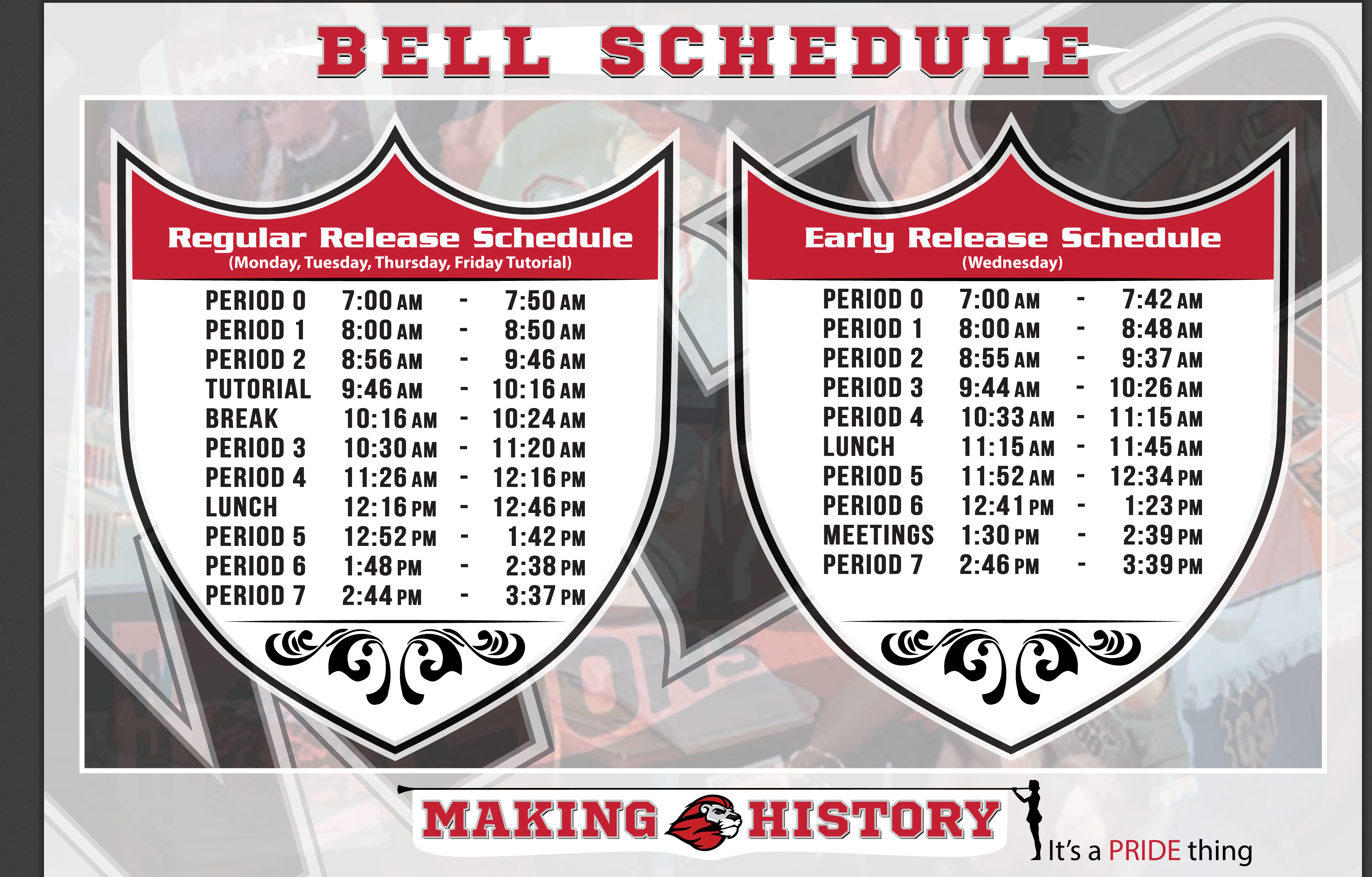
Bell Schedule Graphics
Make a graphic for the bell schedule. I am attaching the PDF file for you to use and copy from.
I am also attaching a reference of another schools bell schedule poster as a PNG. No to copy but as an idea to make a better version of. Our school colors etc.
Make the file like 18.25 x 24.25 Inches. there will be a 1/8 Inch bleed all around. Landscape format the best option probably.
Due:

Assignment
You are going to be developing the design for next years Student Planners.
The student planner theme is "belonging". The design should visually incorporate that theme and the school mascot in some form.
The file size is 8.5 X 11 Portrait - 300 Resolution. Photoshop or Illustrator can be used. Use a safe zone of 1/2 Inch (demo will be given) for all text and important images. Background imagery, background patterns etc. can go to edge and beyond.
Planner must visually include:
2019-2020
Valencia High School or VHS
School mascot logo
Words: "pride - tradition - excellence" somewhere on the cover design.
Previous year planner covers will be attached for reference.
Due:
Assignment
Typography 2.0
Making a typography project over a portrait image of your choice using Adobe Illustrator. You will be placing the text over the image and creating outlines, then adjusting the text to fit over the image.
Due:
Assignment
Zentangle Mandala in Adobe Illustrator
You will be creating a Zentangle mandala in Adobe Illustrator. You will learn about the visual impact of patterns and symmetrical design in this assignment. Using the polygon tool, line tool, shape tool, patterns and specific color combinations, you will be making a radial design that contains whatever creation you can imagine. Examples of one way to do the process are in the link below. We will go over all of the steps on how to create this mandala in class as well (some steps may differ from example steps).
Make sure to have a solid plan and sketch out ideas so that you mandala has meaning (symbols, specific color combos etc). You want to create imagery in the design rather than just random lines. Color schemes and color theory will definitely have a major part in the final grade of the project.
Due:
Assignment
Polygon Portraits
The assignment is to create a polygon or low poly portrait. You can use yourself, celebrity or someone you know as the subject matter. You can even chose to use an animal as the subject matter. There will be demonstrations in class of the process. You are encouraged to research online the process as well. You have the option of using Adobe Illustrator or PhotoShop to complete the process.
Links below are a good start to researching:
Due:
Assignment
Digital Painting
Create a digital painting using Adobe Photoshop and Illustrator. Review previous lessons related to using the brushes. Also make sure to look for simple tutorials on digital painting. Links below will help explain the process. There will also be demonstrations in class.
Links:
Due:


Assignment
Personal Logo Design
To create and develop a logo that represents you. You will need to sketch several ideas (100) on blank computer paper and then finalize those ideas, then use Adobe Illustrator to complete the process of this assignment.
We will go through the drawing process together and the tools you will need to complete this assignment (Pen tool, Line Segment, Type Tool, Shape tool, Divide tool etc.) Make sure to refer to your hand drawing sketches and develop many versions of the logo before settling on the final version.
Final Logo Design Layout:
Make sure the logo is black logo on white background in the pyramid format that will be shown in class. Top logo is 2 inches in longest distance, second row 1 inch, and third row .5 inches.
A brief history into logo design is in the link below. I will also talk about the drawing process and you and show you sketches and previous students work as examples.
Due:
Assignment
In adobe Illustrator, create an artwork that deals with symmetrical design. Tools to use will include the pen tool, shape tool, mesh tool, width tool and more.
Demonstration will be given in class on these tools.
Inspiration for the project and definition of symmetry can be found here:
https://www.smashingmagazine.com/2015/06/design-principles-compositional-balance-symmetry-asymmetry/
Due:
Assignment
Graphic Design
Introduction to Adobe Illustrator and Vector graphics and Self Portraiture.
In this lesson, yo will learn some new tools (Pen, Shape, Color) in Adobe Illustrator and create a vector based Self Portrait, or a portrait of someone you know. No images from the internet can be used.
Links to examples:
Due:
Assignment
Portfolio Piece 2
Breadth or Concentration
Due:
Assignment
Place your first complete work here. Label it First name then Last name.
Due:
Assignment
Portfolio Review.
Create folders for your work. One main Graphic Design folder and subfolders for images, work, font etc.
Due:
Assignment
Building the portfolio.
Please begin formulating ideas for starting to build your portfolio. You will be breaking it in to two parts or sections. The breadth and a concentration as we discussed in class. You will need to have a plan by the due date posted in this assignment. In a word document, formulate ideas in to a structured or bracketed format that makes sense for you, starting with basic ideas and branching out to more specific ideas. Once you have a clear understanding of what your portfolio will consist of, upload it to the google classroom when complete. Feel free to ask me for help in the decision of what your portfolio will consist of. In the meantime, search for previous projects to get started on that may be included in the breadth portion of the portfolio.
Due:
Assignment
Intro to class.